
Uptime monitoring for indie SaaS
External HTTP uptime checks from StillOnline probes: intervals from 5 minutes, check history, and automatic status pages. Free: 1 URL; Pro from $9/mo.
Learn moreProduct
External HTTP checks, a hosted status page, incidents, and owner alerts—no self-hosted stack. Below: live prod screenshots and a dedicated page for each capability.
Quick answer
StillOnline probes your URLs from the outside (from 5-minute intervals on Free), publishes a status page automatically, tracks incidents, and alerts the owner. Free covers 1 project and 1 URL; Pro ($9/mo) adds API, MCP, and private status pages.
See pricing ($0 / $9 / $29) →See also: Free, Pro, Ultimate pricing
StillOnline probes hit your site, API, or /health the way a customer sees the internet—no agent on your server.
Every project gets /s/{slug}: components, uptime, incident timeline. Public on Free; private pages on Pro.
Telegram, Slack, and email to the owner; REST API and MCP for scripts and AI agents on paid plans.
Status pages
No manual status-page setup: StillOnline creates it for you. Customers see operational/degraded per component, uptime, and history—without logging into your admin.
Status pages feature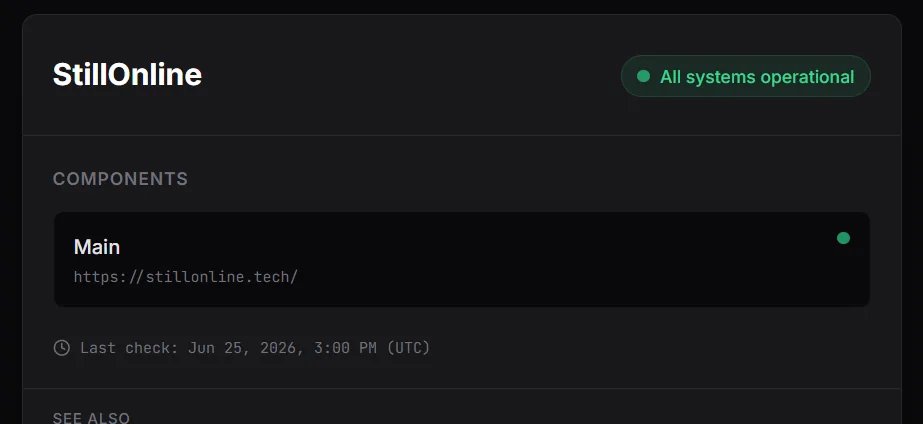
Check history
The Check history tab keeps recent probes: OK/down, response code, milliseconds, and UTC time. Handy for debugging without SSH or server logs.
Uptime monitoring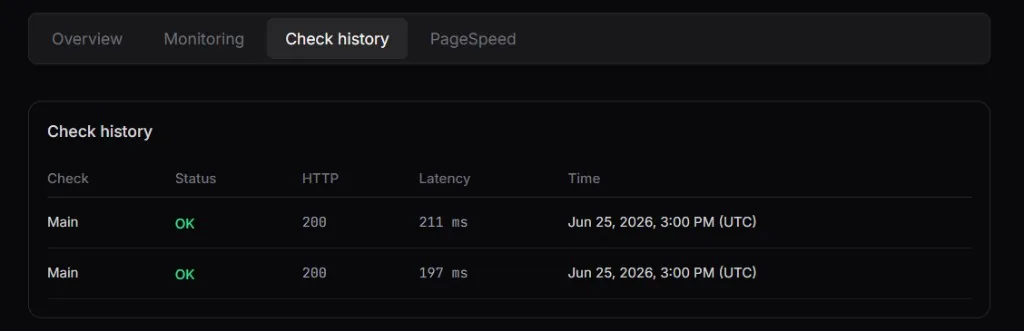
Project dashboard
The project overview shows the last check, URL count, 24h average latency, and the public /s/{slug} link. Screenshot from prod stillonline.tech.
Uptime monitoring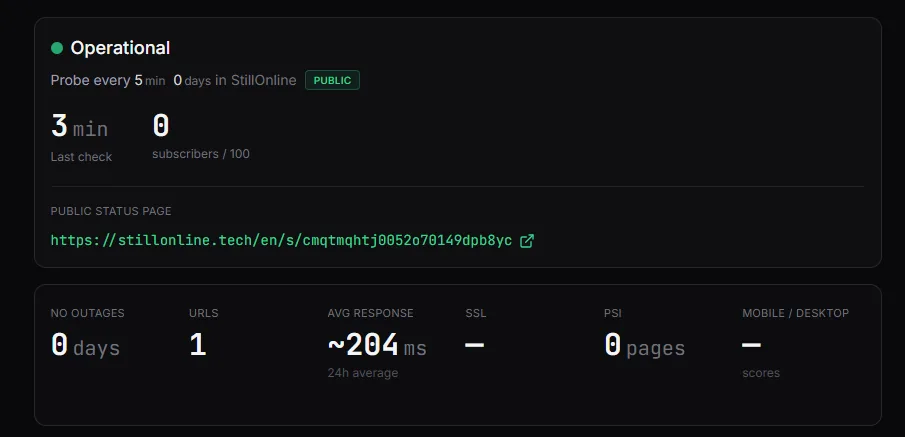
Screenshots from the live StillOnline prod UI (status page and dashboard).
External HTTP uptime checks from StillOnline probes: intervals from 5 minutes, check history, and automatic status pages. Free: 1 URL; Pro from $9/mo.
Learn moreAutomatic public status pages for every StillOnline project. Private pages on Pro. Subscriber email updates, incident timeline, uptime summary—Free tier included.
Learn moreMonitor /health, /ready, or any public API URL with the same HTTP checks as website uptime. Intervals from 5 min on Free. Status page + alerts included.
Learn moreAutomatic incidents from failed probes plus manual updates. Email subscribers on the status page. Incident API on Pro. Timeline: investigating to resolved.
Learn moreGet notified when checks fail or recover. Free: one alert channel. Pro and Ultimate: enable email, Telegram, and Slack together. 15-minute throttle.
Learn morestillonline-mcp npm package lets Cursor, Claude Code, and Codex read projects, checks, and incidents via Model Context Protocol. Pro and Ultimate.
Learn morePublic status JSON at /v1/public/status/{slug} plus private v1 API for projects, checks, and incidents. OpenAPI docs. Pro and Ultimate from $9/mo.
Learn moreGoogle PageSpeed Insights checks on Pro and Ultimate. Pro: 3 URLs, daily auto + 1 manual/day. Ultimate: 5 URLs, 12h auto + 3 manual/day. Not on Free.
Learn moreSSL checks track certificate expiry and alert before downtime. Uses your per-project check quota on all plans. Default alert window: 14 days before expiry.
Learn moreAutomation
{
  "slug": "demo",
  "status": "operational",
  "components": [
    { "name": "Website", "status": "operational" },
    { "name": "API", "status": "operational" }
  ],
  "updated_at": "2026-06-25T12:00:00Z"
}StillOnline targets indie SaaS: status pages, incidents, and API/MCP in one lightweight hosted service. Plan limits and pricing are compared on /vs/stillonline-vs-alternatives.
No. Checks run from StillOnline external probes over HTTP(S). A public URL is enough—/health, homepage, or any API endpoint.
1 project, 1 URL, 5-minute interval, public status page, 24 hours of history, and one owner alert channel. REST API and MCP require Pro ($9/mo) or higher.
SSL certificate expiry uses your per-project check quota on all plans. Google PageSpeed (Lighthouse) is on Pro and Ultimate with separate URL limits.
Free sign-up—a status page in about a minute.
No heavy observability stack. · No self-hosting. · No extra complexity.